


At a glance
| What transcription does | Turns speech into searchable, quotable, source-linked text |
|---|---|
| Where it fits | Meetings, interviews, lectures, podcasts, calls, voice notes |
| Output | Editable transcript with word-level timestamps; captions on export |
| Speaker labels | Standard & Premium (diarization); rename speakers afterwards |
| Review needed | Higher for names, numbers, jargon, and high-consequence records |
| Free (no account) | First 5 minutes per file, up to 50 MB, preview export |
What AI transcription is actually for
AI transcription earns its place whenever a recording is worth more as text than as audio. Text is searchable, skimmable, quotable, and easy to paste into a doc, ticket, or CRM — a recording is none of those. The value is not the words alone but the fact that every word links back to the moment it was said, so you can verify a quote in one click instead of scrubbing a timeline.
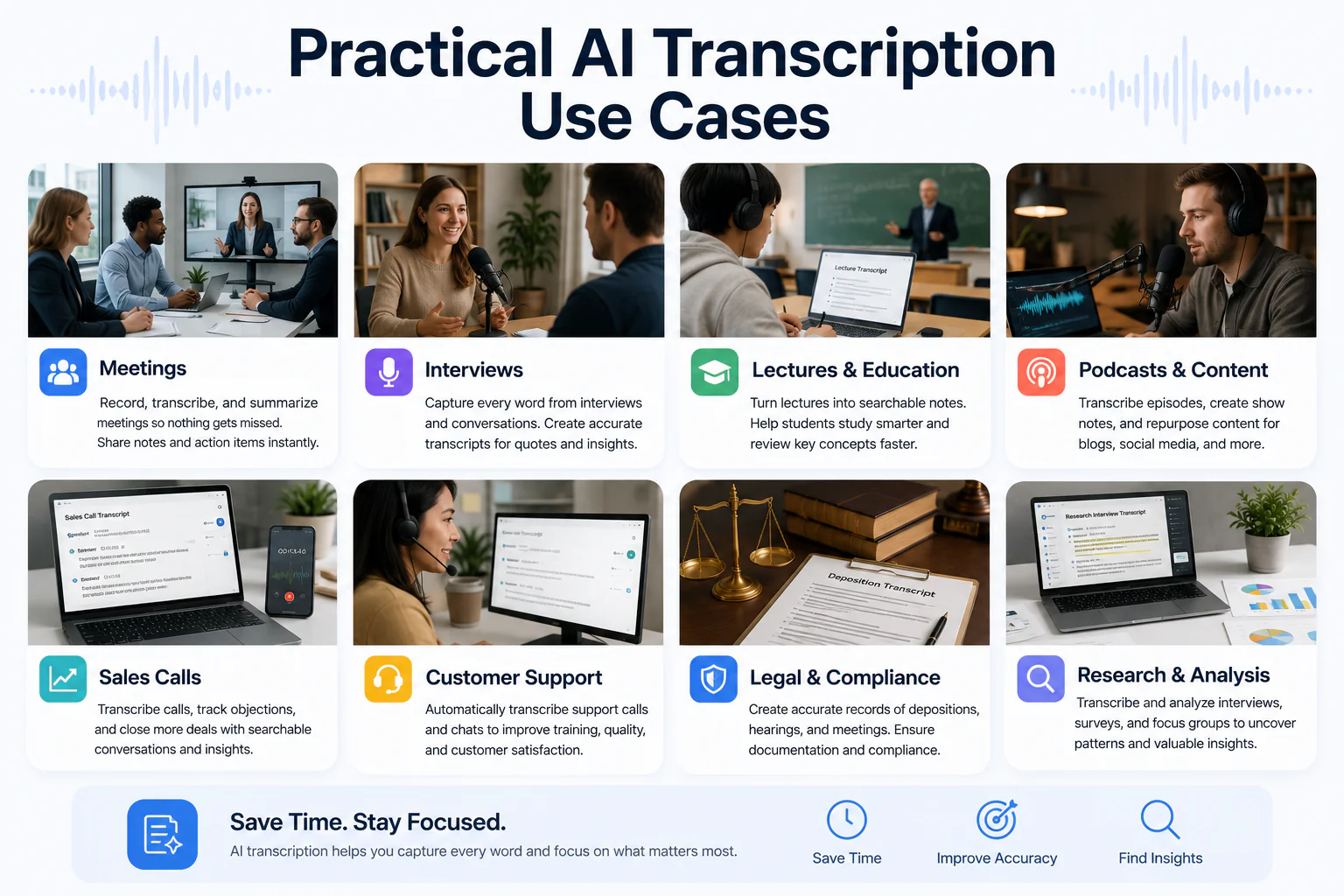
Quick use-case map
Most people arrive with one of a handful of jobs to do. Find the row that matches your workflow, then open the role page for the detailed playbook.
| Workflow | What the transcript is used for | Role page |
|---|---|---|
| Sales calls | Capture objections, next steps, and CRM notes without typing | /use-cases/sales-teams |
| Customer success | Log account calls and surface churn or renewal signals | /use-cases/customer-success |
| Recruiting | Interview notes, scorecards, and fair candidate comparison | /use-cases/hiring-recruiting |
| Research | Codeable interview transcripts with timestamps for analysis | /use-cases/researchers |
| Journalism | Quotable, verifiable interview records for fact-checking | /use-cases/journalists |
| Consulting | Discovery and workshop notes turned into deliverables | /use-cases/consultants |
| Video & podcasts | Show notes, captions, and repurposed clips | /use-cases/video-creators |
| Education | Lecture transcripts and study notes students can search | /use-cases/educators |
| Legal & regulated | Reviewed records where accuracy is high-consequence | /use-cases/legal-teams |
Meetings and business calls
For meetings and calls, the transcript is a shared record of decisions and next steps, not a keepsake. Speaker labels (Standard and Premium) split the conversation by voice so you can tell who committed to what, and the fixed AI-action menu can distil the transcript into meeting minutes, action points, or a decision list. Sales and customer teams get the most value because the output flows straight into a CRM or a follow-up.
Two paths exist here: upload a recording after the fact, or use the meeting bot (Zoom, Google Meet, Teams via Recall.ai) on Standard and Premium to capture the call directly. Both produce the same reviewable transcript. See the sales and customer success playbooks for how each team turns calls into follow-through: /use-cases/sales-teams and /use-cases/customer-success.
Research and interviews
For interviews, the transcript is the raw material you analyse, so fidelity and structure matter more than speed. Word-level timestamps let you jump back to the exact phrasing behind a quote, and speaker labels keep each participant's answers separate — essential for coding qualitative data or comparing candidates on the same questions. Correcting names, figures, and specialist terms is where the human review pays off.
Researchers doing thematic analysis and recruiters running structured interviews share the same core need: consistent, searchable, attributable transcripts. The role pages cover coding-friendly exports and fair-comparison workflows: /use-cases/researchers and /use-cases/hiring-recruiting.
Journalism and verification
For journalists, a transcript is only useful if every quote can be traced back to the recording. The value is verification: click a word to hear it in context before you publish, so a misheard number or name never makes it into print. The AI draft is a fast first pass — the reporter's review against the audio is what makes the quote defensible.
Treat the transcript as evidence you check, not a source of truth on its own. The journalism playbook covers quote verification, consent, and secure handling: /use-cases/journalists.
Podcasts and video
For creators, one transcript feeds several outputs. The same reviewed text becomes show notes, a searchable episode archive, pull-quotes for social, and — on export — SRT or VTT caption drafts to load into an editor. Captions widen your audience and lift discovery, but SRT/VTT from any tool are reviewable drafts, not finished, styled, accessibility-certified subtitles.
Video creators and podcasters use transcripts to repurpose long recordings into many small assets. The role pages go deeper on captioning and clip workflows: /use-cases/video-creators and /use-cases/podcasters.
Lectures and education
In education, the transcript turns a one-time lecture into a searchable study resource. Students can find the exact minute a concept was explained, review at their own pace, and copy accurate definitions instead of half-remembered notes; educators get an accessible record and a base for summaries or topic segmentation. Automatic transcripts are a study aid, not a substitute for official accessibility accommodations.
The education playbook covers lecture capture, accessibility, and study-note workflows for both sides of the classroom: /use-cases/educators.
Voice memos and personal notes
The smallest use case is often the most frequent: dictate a voice memo on your phone and get a text note you can search and edit. There is no meeting, no speakers to separate — just spoken thoughts converted to text you can drop into a task list or document. This is where the free tier shines, since most memos fit inside the first five minutes.
Illustrative example. You record a two-minute idea while driving, upload the M4A afterwards, and paste the cleaned-up text straight into your notes app. For the file-format specifics, see /voice-memo-to-text and /m4a-to-text.
Captions and timed text
When the goal is on-screen text, the transcript becomes timed captions. Exporting SRT or VTT gives you a time-coded draft aligned to the audio that you review for accuracy and load into a video editor or player. The distinction to keep in mind: a transcript is a document, captions are timed lines synced to playback, and neither is a certified subtitle track until a human has checked and styled it.
| Output | What it is | Best for |
|---|---|---|
| Transcript (TXT/DOCX/PDF) | A readable document of what was said | Notes, quotes, records, search |
| Captions (SRT/VTT) | Time-coded lines synced to the video | Video review and editing |
| Summary (AI action) | A condensed derivative of the transcript | Recaps, action points, minutes |
Translation and multilingual workflows
For multilingual teams, transcription is the first step and translation is the second. The recognizer auto-detects the spoken language, and you can translate the resulting transcript into 30+ languages to share notes across a team or make an interview readable to a wider audience. Machine translation is a working draft too — check names, idioms, and anything quoted before you rely on it.
High-consequence uses and human review
The higher the stakes, the more the human review matters — and the more likely an AI draft alone is the wrong tool. Legal, medical, and compliance records need verbatim accuracy and often a certified transcriber; an AI transcript can speed up the first pass, but it does not replace a certified record. Errors on numbers, names, and dates are the ones most likely to cause real damage, so review those deliberately in any regulated context.
Teams working in regulated settings still get value from fast drafts plus disciplined review. The legal playbook covers that boundary and secure handling: /use-cases/legal-teams.
Choose the right workflow
Pick the workflow by what you will do with the words. If you need a shared record of decisions, that is a meeting workflow with speaker labels. If you will quote or analyse the speech, that is an interview workflow that leans on timestamps and review. If the text goes on screen, that is a captions workflow. If it is just for you, a voice memo is enough. The right plan follows from file length and whether you need diarization.
- Meetings and calls → speaker labels + AI action menu (Standard/Premium).
- Interviews and research → word-level timestamps + careful review.
- Video and podcasts → SRT/VTT caption drafts + show notes.
- Personal notes → free tier, first 5 minutes, no account needed.
- Regulated records → AI draft to speed a human, not to replace one.
Not sure where to start? Drop a recording from your own workflow into the uploader above — the first five minutes are free and no account is required.
Frequently Asked Questions
What are the main AI transcription use cases?
The common ones are meetings and sales calls, research and job interviews, journalism, lectures and study notes, podcasts and video captions, voice memos, and multilingual workflows. Each uses the transcript differently — as a shared record, a quotable source, timed captions, or searchable personal notes.
Who uses transcription software?
Sales and customer success teams, recruiters, researchers, journalists, consultants, video creators and podcasters, educators and students, and legal or compliance teams. Anyone who needs spoken information to become searchable, quotable, or shareable text benefits from it.
How do businesses use AI to transcribe audio?
They upload recordings or use a meeting bot to capture calls, then turn the reviewed transcript into CRM notes, meeting minutes, action points, or follow-ups using the built-in AI actions. Speaker labels on Standard and Premium make it clear who said and committed to what.
What is the difference between a transcript, a summary, and captions?
A transcript is the full text of what was said. A summary is a shorter derivative — minutes, action points, or key quotes. Captions (SRT/VTT) are time-coded lines synced to a video. One transcript can feed all three.
Is AI transcription accurate enough for legal or medical records?
Use it as a fast first draft, not a certified record. High-consequence documents need verbatim accuracy and often a certified human transcriber. Review names, numbers, and dates carefully in any regulated context.
Can I try a use case for free?
Yes. Without an account you can transcribe the first 5 minutes of a file up to 50 MB and preview the result, which is enough to test quality on your own recording. A free account adds 3 transcriptions a day.
Does transcription work for interviews with several speakers?
Yes, on Standard and Premium, where speaker identification (diarization) splits the conversation by voice. You can rename Speaker 1 to real names afterwards. The free tier does not include diarization.
Can I transcribe audio in other languages?
Yes. The language is auto-detected, and you can translate the finished transcript into 30+ languages. Treat machine translation as a draft and check quoted material before relying on it.
Related resources
Reviewed by the TranscribeThis product team · Last updated: July 2026