


What Is Podcast Transcription?
Podcast transcription converts a recorded episode into text with speaker labels and word-level timestamps, so every line stays tied to the moment it was spoken. Hosts, producers, and editors use it to find a quote without scrubbing the audio, to publish a readable version of an episode, and to keep a back catalog that can be searched by what was actually said.
Two things make a transcript worth keeping. It is the archive — what makes a two-year-old conversation findable by a sentence someone said, rather than by the episode title someone hoped would describe it. And it is text on a page: a crawlable transcript gives search engines something to read on an episode that is otherwise an audio file. Whether that moves your rankings depends on the quality of the page, your site's authority, internal links, and whether the page is genuinely useful. A transcript alone is not a ranking strategy.
Podcast Transcription at a Glance
| Inputs | Interview episodes, solo monologues, co-hosted shows, panels, video podcasts |
|---|---|
| Speakers | Host, co-host, and guests labeled automatically; worth checking after a panel |
| Search | Keyword search inside an episode and across your whole back catalog |
| Timestamps | Word-level timestamps; click a line to play that second of the episode |
| Annotation | Colour highlights with a comment attached, for pull quotes and production notes |
| AI output | Summary, key quotes, action points, decisions, risks, deadlines |
| Editorial boundary | No show notes, episode titles, chapters, social posts, or clips written for you |
| Exports | TXT and JSON free; PDF, DOCX, SRT, VTT on paid plans |
| Account | Transcription works without an account; AI passes and annotation need a free one |
Find the Line You Half-Remember
A guest said something about pricing in an episode last spring and you remember nothing else about it. Search the word inside the episode and click the line to hear it back, or search across your library to find which episodes mention it at all. It matches words rather than meaning, so searching for churn will not surface a guest who said people leaving.


Mark Pull Quotes and Leave Production Notes
Highlight the passage you want on the episode page, in a colour that means something to you, and attach a comment — a name to verify, a claim to check, a spot where the audio needs attention. The note stays with the episode, so it is still there when someone else does the final pass.
Summaries and Key Quotes
One-click passes run over the full episode: a summary of what was discussed, and a key-quotes pass that pulls candidate lines with their timestamps. The catalogue is fixed — summary, key quotes, action points, decisions, risks, deadlines — and for a podcast the first two carry the weight. Run decisions or deadlines on a conversational interview and it will find little, because there usually is little to find.

What a Podcast Artifact Looks Like
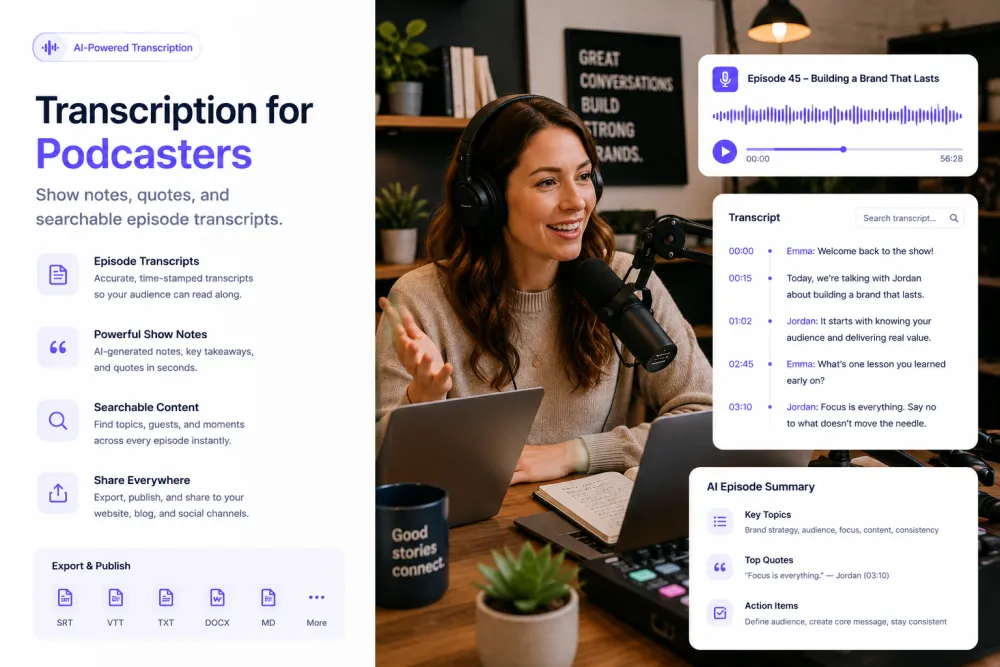
An illustrative founder interview: a transcript excerpt, what the producer marked on it, and the AI passes generated from the full episode.
Illustrative example, not a real interview. The AI summarizes what was actually said rather than filling a fixed template, and the highlight and the comment are written by the producer — the product does not decide which line belongs on the episode page. On an episode like this, the decisions and deadlines passes would return almost nothing, which is normal for a conversational interview: the summary and the key quotes are the two that earn their place.
What the Transcript and Passes Give You
Depending on the episode, the record and the AI passes can help you locate:
Episode Types
Anything with speech in it transcribes the same way; these are the formats shows bring most often.
One host, one guest, and a transcript whose value is the guest's phrasing — the part you will quote and the part you must not paraphrase.
A single voice close to a single microphone. This is the easiest case for transcription and the fastest to turn into a readable page.
Two regular voices who interrupt each other comfortably. Speaker labels usually hold, and cross-talk is where they slip.
Four or five speakers, often remote. Expect to correct labels, especially between voices in the same register.
Scripted narration cut with tape. The transcript works as the paper edit — it is how you find one line inside hours of raw interview.
Upload the video file. The transcript stays linked to the timeline, and SRT or VTT export on a paid plan gives you a caption file to upload wherever the video lives.
Episodes made for a client, where the approval round moves faster when the reviewer can read the conversation instead of listening to it twice.
Explanatory shows dense with terms, names, and numbers, where a searchable text version is the thing listeners come back for.
Where Podcast Recordings Come From
Remote recording tools
Upload the audio or video file your remote recording tool exports. Separate local tracks per speaker are the best input you can give any transcription system, because each voice arrives clean.
Field recorders and interfaces
WAV or MP3 from a recorder or an audio interface. A microphone per person beats one microphone in the middle of the table by a wide margin.
Video calls
An MP4 or an audio-only export from a call recording works. A single mixed track makes speaker labeling harder than separate tracks would.
Edited masters
You can transcribe the finished export instead of the raw session — useful when the transcript needs to match the published episode exactly, music beds and all.
TranscribeThis processes files you upload. It does not host or publish episodes, does not connect to any podcast host or distribution platform, and does not transcribe live.
The Production Workflow
Each step is something a producer already does; the transcript is what makes the episode searchable once it is out.
- Record
- Upload
- Transcript
- Check speakers
- Mark quotes
- Summary pass
- Write show notes
- Export or publish the text
Listening Back vs. a Searchable Transcript
| Scrubbing the audio | TranscribeThis |
|---|---|
| Re-listening to an hour to find one line | Searching for the word and clicking the line |
| A quote typed out from memory | A quote you can play back at its timestamp |
| A back catalog only you can navigate | A back catalog anyone on the show can search |
| Guest names and figures spelled by guesswork | Names and figures visible in text and checkable against the audio |
| Show notes written while the episode plays in the background | Show notes written from a transcript and a summary you already have |
A Transcript vs. Show Notes
A transcript is the complete spoken record of an episode: every line, in order, with speakers and timestamps. Its job is completeness, not readability.
Show notes are the opposite — an editorial summary written for listeners, with a hook, a structure, links, and all the parts you decided to leave out. TranscribeThis can generate a summary of what was discussed, but a summary is not show notes. It does not write your show notes, episode titles, chapter markers, social posts, or clips, and it does not choose which moment your episode should be sold on. That judgement stays with the producer.
In practice the transcript and the summary are what you write from. You open both, take the quotes you marked, and write the notes yourself, in the voice the show already has.
Podcast Accuracy and Limitations
Accuracy is not a fixed number. These are the conditions that move it on podcast audio, and the checks worth doing before a transcript reaches the episode page:
Guest Consent and Unreleased Episodes
An unpublished episode is embargoed material, and a guest recording is an identifiable person speaking on the record. This section is guidance, not legal advice.
Ask before recording, and be explicit that the episode will be published and where. Consent to a conversation is not consent to distribution, and a guest may reasonably want a passage cut.
Before release, the recording, the transcript, and any share link are pre-publication material. Share links are revocable — revoke them once the episode is out or the review is finished.
Files travel over TLS and are stored encrypted. Guest uploads that are not saved to an account are deleted automatically; files in your account stay until you delete them. Your episodes are not training data.
If a guest asks for something to be cut, remember it still exists in the raw transcript and in any export you shared. Remove it there too, not only in the edit.
Formats, Languages, and Limits
Try It With a Real Episode
Upload an episode and review the transcript, speaker labels, and word-level timestamps before choosing a plan. No signup for files up to 50 MB.
Related Pages
Frequently Asked Questions
Can TranscribeThis transcribe a podcast episode?
Yes. Upload the audio or video file and you get a speaker-labeled transcript with word-level timestamps, usually in about two minutes per hour of audio. Transcription works without an account for files up to 50 MB.
Does it label the host and the guest separately?
Yes. Speaker labels separate the voices automatically, which is what makes an hour-long conversation readable instead of a wall of text. They are worth checking on panels and wherever host and guest talk over each other.
Can I search across my whole back catalog?
Yes. One search finds which episodes contain a term, and inside an episode you can search and click a line to play that moment. It matches words rather than meaning, so a synonym you did not search for will not surface.
Does it automatically write show notes?
No. It generates a summary of what was discussed, which is a different thing. Show notes are editorial: a hook, a structure, links, and a decision about what to leave out. You write those from the transcript and the summary; the product does not write them, and it does not write episode titles or chapter markers either.
Can it generate social posts, audiograms, or clips?
No. There is no clip generation, no audiogram export, no social copy, and no video or audio editing of any kind. What you get is a transcript, annotations you add, the fixed AI passes, and file exports.
Will publishing a transcript improve my podcast's SEO?
It gives search engines something to read, which an audio file on its own does not. That is the honest version of the claim. Whether it changes your rankings depends on the quality of the page you publish it on, your site's authority, internal linking, and whether the page is useful to a reader — a transcript pasted onto a thin page is not a ranking strategy, and anyone promising you rankings for one is guessing.
What AI summaries can I get from an episode?
A fixed catalogue: summary, key quotes, action points, decisions, risks, and deadlines. For a podcast the summary and the key quotes are the two that pay off; a conversational interview rarely contains decisions or deadlines, so those passes will return little. They are one-click passes rather than a prompt you write, and they need a free account.
Can I get a caption file for a video podcast?
Yes, on a paid plan. Export SRT or VTT and upload it wherever the video is published. TXT and JSON are free. The product does not style captions or burn them into video.
Does it connect to my podcast host?
No. There is no integration with any podcast host or distribution platform, and no publishing or hosting of any kind. You download an export and upload it yourself. There are no other app integrations either: you can copy the text, download a file, or share a revocable read-only link.
How accurate is it on remote guests and panels?
It depends on the audio more than on anything you can set. A clean local track per speaker transcribes very well; a remote guest on a weak connection, several similar voices on a panel, or a music bed under speech will all cost you accuracy — mostly in speaker labels and proper nouns.
Do I need permission from my guests?
Ask before you record, and say plainly that the episode will be published and where. Consent to talk is not consent to distribute. If a guest asks for a passage to be cut, remove it from the transcript and any export you shared, not only from the audio. This is guidance, not legal advice.
Can I edit the audio or cut a clip inside TranscribeThis?
No. There is no audio or video editing, no clipping, and no chapter generation. Edit in your usual editor; use the transcript to find the timestamps you need before you get there.
Details on encryption, retention, and how we handle your files: Privacy Policy · Terms of Service
Reviewed by the TranscribeThis Speech Recognition Team.
Last updated: July 2026