


At a glance
| What Otter is | A meeting-focused transcription and notes tool (real-time meeting notes, summaries) |
|---|---|
| Typical plan shape | Free tier + individual paid tier(s) + team/business tier + education option |
| What drives cost | Monthly transcription minutes, import/upload caps, meeting features, and number of seats |
| Current numbers | Not listed here on purpose — verify on Otter's pricing page |
| This page | Structure and evaluation criteria, not quoted prices |
| Last verified | July 2026 — confirm on Otter's current pricing page |
Why this page avoids quoting exact prices
Transcription pricing pages change often — tiers get renamed, minute caps move, and promotional prices come and go. Publishing a specific dollar figure or minute limit here would go stale the moment Otter updates its plans, so this guide deliberately describes the plan structure and the levers that drive cost instead of numbers you should not trust.
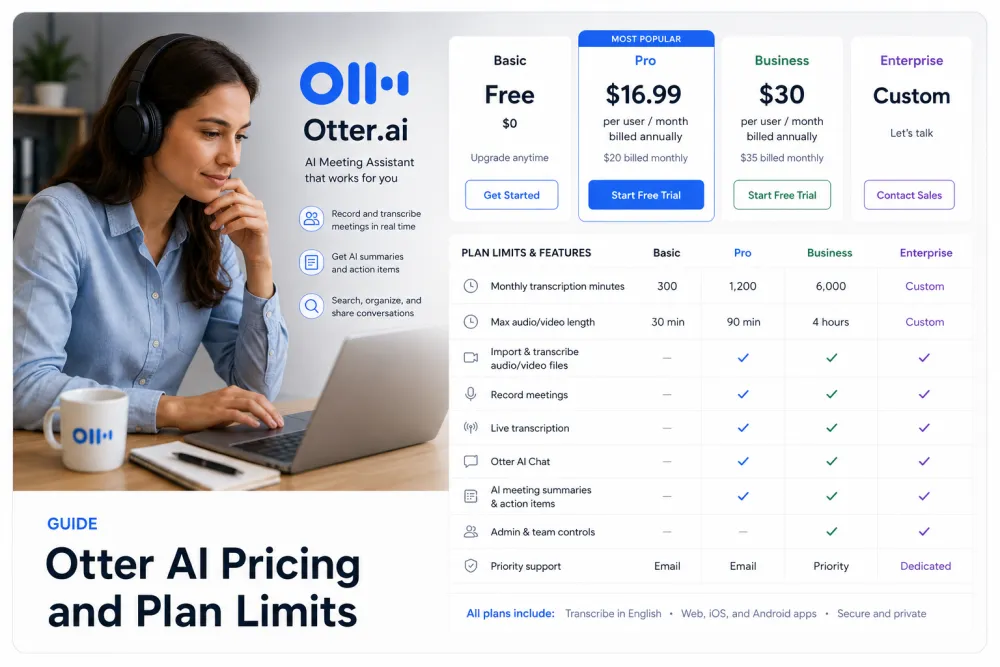
How Otter's plans are structured
Otter, like most meeting-notes tools, splits its offering into a free tier, one or more individual paid tiers, a team/business tier, and (typically) an education option. The tiers differ mainly by how many transcription minutes you get, how many files you can import, which meeting and collaboration features unlock, and how many seats a team can add — not by a fundamentally different transcript.
| Tier type | Who it targets | What usually changes vs the tier below |
|---|---|---|
| Free | Trying it out, light personal use | Lowest monthly minutes, tightest import limits, fewest features |
| Individual paid | Solo professionals | More monthly minutes, more imports, added meeting/AI features |
| Team / business | Teams sharing notes | Per-seat billing, admin controls, shared workspaces |
| Education | Students / educators | Discounted access where eligible — verify eligibility and current terms |
Treat the table as the shape of the offering, not the specifics. The exact minute allowances, import caps, and which features sit on which tier are the things most likely to have changed since this was written — read them on Otter's page.
What drives the cost
Four levers move the price on meeting-transcription tools. Knowing which one matters for you is more useful than memorising a tier name.
- Monthly transcription minutes — the headline cap. Heavy meeting days burn through minutes fast; estimate your real monthly hours before choosing a tier.
- Import / upload limits — how many existing recordings you can bring in, and how long each can be. Often more restrictive than the live-meeting allowance.
- Meeting features — auto-join meeting assistant, live summaries, and integrations usually sit behind paid tiers.
- Team seats — team/business pricing is per seat, so cost scales with headcount, not just usage.
What to check before you buy
Run this short checklist against the vendor page rather than trusting any summary (including this one):
- Your real monthly transcription hours — then match them to the current minute cap with headroom.
- The import/upload limit if you have a back catalogue of recordings to process.
- Which meeting and AI features you actually need, and which tier they unlock on today.
- Seat count and per-seat price if this is for a team.
- Education eligibility and the current discounted terms, if that applies to you.
- Export and data-retention terms — can you get your transcripts out, and how long are they kept?
Otter vs TranscribeThis
Otter is best known for real-time meeting notes — an assistant that joins calls and produces live summaries. TranscribeThis is post-recording: you bring a recording (or record in-browser with an account), get an AI draft, review it against the audio, and export. They overlap on transcription but lead with different jobs, so compare on the criteria below rather than a headline price. For exact numbers, send yourself to each vendor: check Otter on its pricing page, and see our plans at /pricing.
| Criterion | TranscribeThis (verified) | Otter (check vendor page) |
|---|---|---|
| Primary job | Upload/record a file, then transcribe and review | Real-time meeting notes and summaries |
| Try without an account | Yes — first 5 minutes, files up to 50 MB, 5 uploads/min | Check Otter's current free-tier terms |
| Free-account limits | 3 transcriptions/day, first 5 min each, 150 MB storage, preview export | Check the vendor page |
| Paid file limits | Up to 2 GB / 5 h (Standard), 5 GB / 8 h (Premium) | Described in minutes/seats — check the vendor page |
| Speaker labels | Yes on Standard & Premium (diarization) | Check the vendor page |
| Word-level timestamps | Yes for uploads/recordings (YouTube = segment-level) | Check the vendor page |
| Exports | TXT, DOCX, PDF, SRT, VTT (full export paid; free = preview) | Check the vendor page |
| Cost model | Tiered by file size/length and features (see /pricing) | Tiered by minutes and seats — check the vendor page |
Only the TranscribeThis column states specifics, because those are the numbers we can verify. Otter cells point you to the vendor on purpose — we will not publish a competitor price or cap that may already be out of date.
Alternatives by workflow
Pick by the job you are actually doing, not by whichever tool ranks first:
- Live meeting notes across many calls — a meeting-first assistant like Otter fits, if the minute and seat math works for your team.
- Transcribing existing recordings (interviews, lectures, voice notes, podcasts) — a post-recording tool like TranscribeThis: bring the file, review the draft, export.
- Certified or verbatim transcripts for legal or medical records — a professional human transcription service; AI drafts (ours or Otter's) are fast first passes, not certified records.
- One-off or occasional use — start with a genuine free tier or a preview before paying, and confirm the cap covers your file.
Frequently Asked Questions
How much does Otter AI cost?
Otter uses a free tier plus paid individual and team tiers, with an education option. Because prices and minute limits change often, we do not quote a figure here — check Otter's current pricing page for the exact numbers.
Does Otter AI offer education pricing?
Meeting-transcription tools commonly offer a discounted education option for eligible students and educators. Whether it is available to you, and on what terms, changes over time — confirm eligibility and the current discount on Otter's pricing page.
What are the limits on Otter's free plan?
Free tiers on these tools are usually capped by monthly transcription minutes and import limits, and may act more like a preview than a lasting plan. The specific caps change, so verify them on the vendor page rather than trusting a number here.
What plans does Otter AI have?
Typically a free tier, one or more individual paid tiers, a team/business tier billed per seat, and an education option. The tiers differ mainly by minutes, import limits, meeting features, and seats — check the current lineup on Otter.
What drives the price on meeting-transcription tools?
Four levers: monthly transcription minutes, import/upload caps, which meeting and AI features unlock, and the number of team seats. Estimate your real monthly hours and headcount before choosing a tier.
Is TranscribeThis a good alternative to Otter?
If your main job is transcribing existing recordings rather than taking live meeting notes, a post-recording tool like TranscribeThis fits well: try the first 5 minutes free with no account, review the draft, and export. Compare both on the criteria that matter and check each vendor's current pricing.
Can I try transcription before paying?
Yes with TranscribeThis — upload a file at the top of this page and transcribe the first 5 minutes with no account (up to 50 MB). For other tools, look for a genuine free tier or preview and confirm the cap covers your recording before you buy.
Are AI transcripts accurate enough to rely on?
AI transcription does very well on clear, single-speaker audio and needs more review on accents, crosstalk, or noisy phone recordings. Treat any "99% accurate" headline as a best case, and verify quoted quotes and numbers against the recording — this applies to every tool in the category.
Related resources
Reviewed by the TranscribeThis product team · Last updated: July 2026